Project Overview
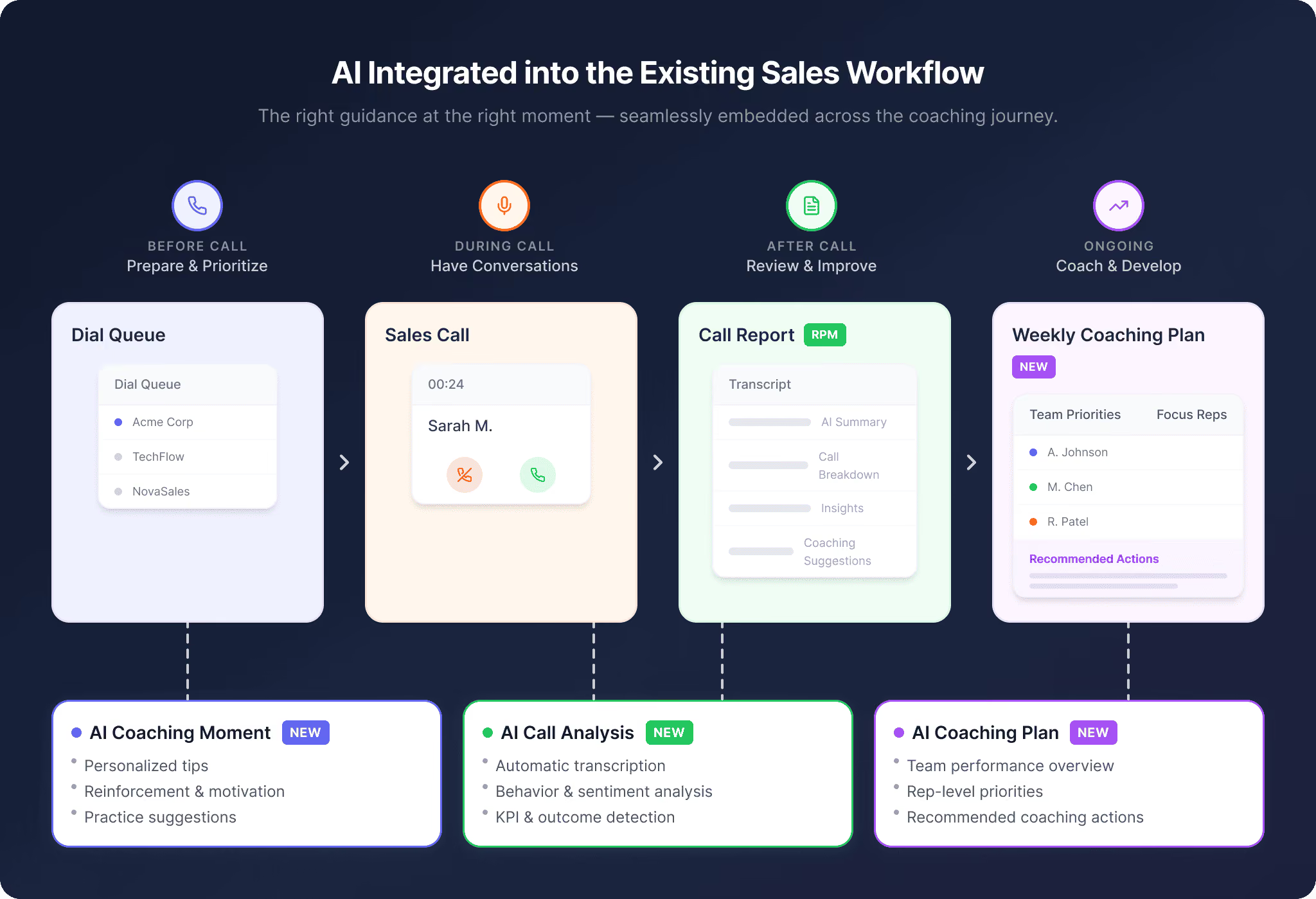
Sellfire is an AI-powered sales performance platform that helps sales teams analyze conversations, identify coaching opportunities, and improve sales outcomes. As the Sole Product Designer for the AI Coaching initiative, working with the PM, engineering, and sales leadership, I designed an AI-powered coaching ecosystem that integrates intelligence directly into existing sales workflows instead of creating a separate AI experience.
I designed three interconnected experiences:
1. Call Report → Transform post-call analysis into actionable AI coaching insights.
2. AI Coaching Moment → Deliver contextual guidance during existing sales workflows.
3. Coaching Hub → Help reps and managers track progress and take action over time.
My focus was balancing AI capabilities, user trust, workflow efficiency, business goals, and technical feasibility.
Tools
Figma | Figma Make | Adobe Creative Suite
Keywords
AI Product Design | B2B SaaS | Enterprise Platform | UX Strategy | User Research | Workflow Optimization | Series A Startup | Rapid Prototyping
My Role
Product discovery & problem framing
Key Outcomes
✓ Shipped as part of Sellfire's Series A launch
✓ Designed AI coaching across 3 connected product areas for sales reps and managers
✓ Validated concepts with reps and managers through focus groups and prototype testing
✓ Created reusable AI interaction patterns for future features
Challenge
Existing Workflow
Sales teams already relied on Sellfire's existing workflows:
- Sales Representatives: Make calls ➡ Review performance ➡ Improve skills
- Managers: Analyze calls ➡ Provide feedback ➡ Coach teams
However, AI introduced new challenges:
Design Challenges
1. Avoid Creating Another Tool
Users already had established workflows.
❌ Separate AI dashboard
❌ Another place to check insights
✅ AI should appear where decisions already happen
2. Make AI Actionable
AI-generated insights alone are not valuable.
Users need: Insight ➡ Understanding ➡ Action
3. Support Different User Needs
- Sales Reps: self-improvement, immediate feedback, practice recommendations
- Managers need: team visibility, coaching opportunities, performance trends
Product Strategy
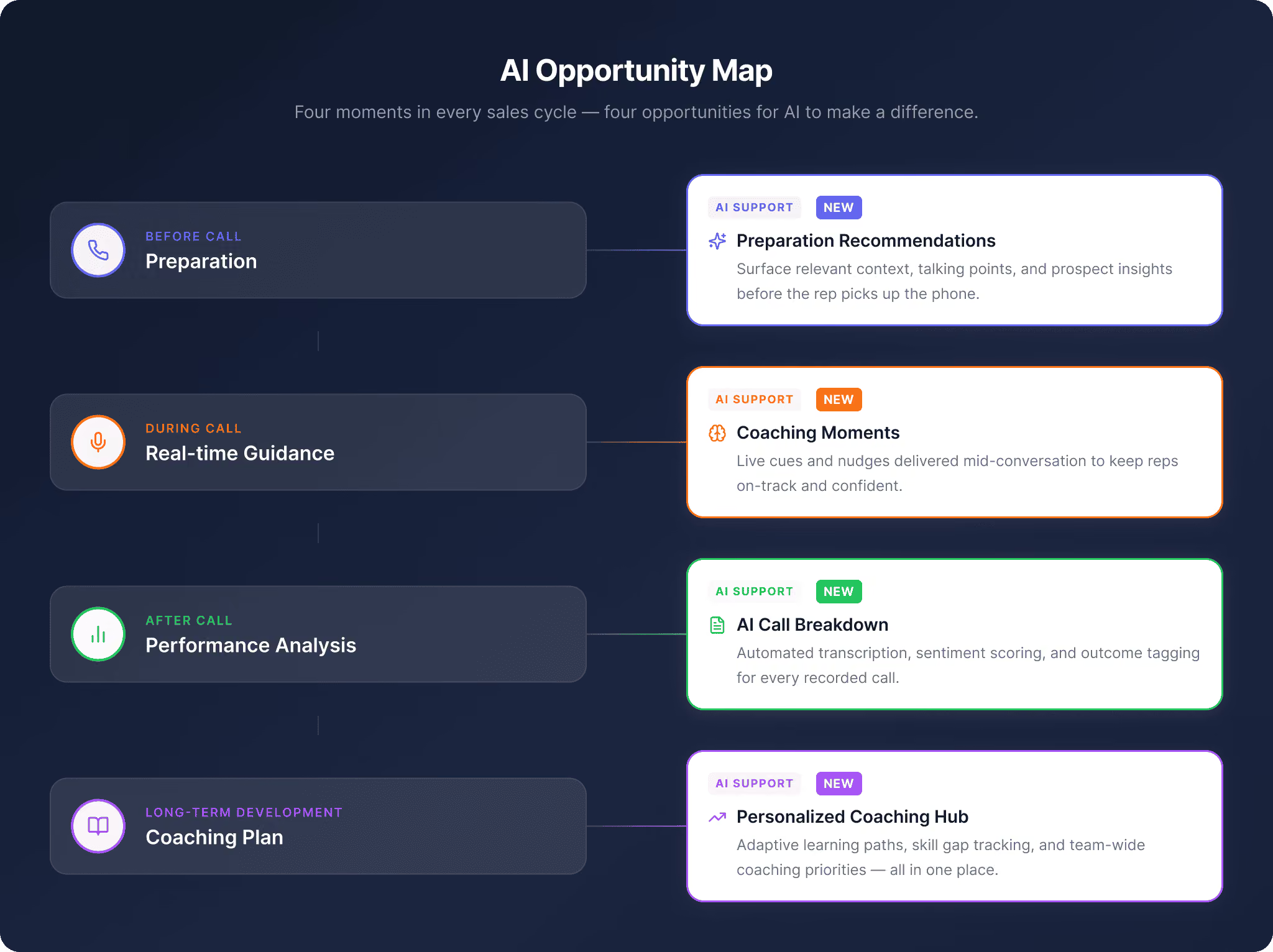
From AI Feature ➡ AI Ecosystem
Instead of designing isolated AI features, I mapped where AI could create value throughout the user journey.
AI Experience Principles
We're designing AI that users trust. AI should not replace human judgment. It should help users make better decisions.
Principle 1: Context Before Intelligence
AI appears based on user context.
E.g.:
❌ "Here are 10 sales insights."
✅ "Your objection handling decreased during pricing discussions. Try this coaching exercise."
Principle 2: Explainable Recommendations
Every AI insight should connect back to evidence.
E.g.: AI Insight: Customer engagement decreased
➡ Transcript Evidence: Customer paused after pricing discussion
➡ Action: Practice objection handling
Principle 3: Reduce Cognitive Load
AI should simplify workflows. Not add more information.
Call Report Evolution
Redesigning Post-Call Analysis Experience
The goal was to transform call data into actionable coaching conversations.
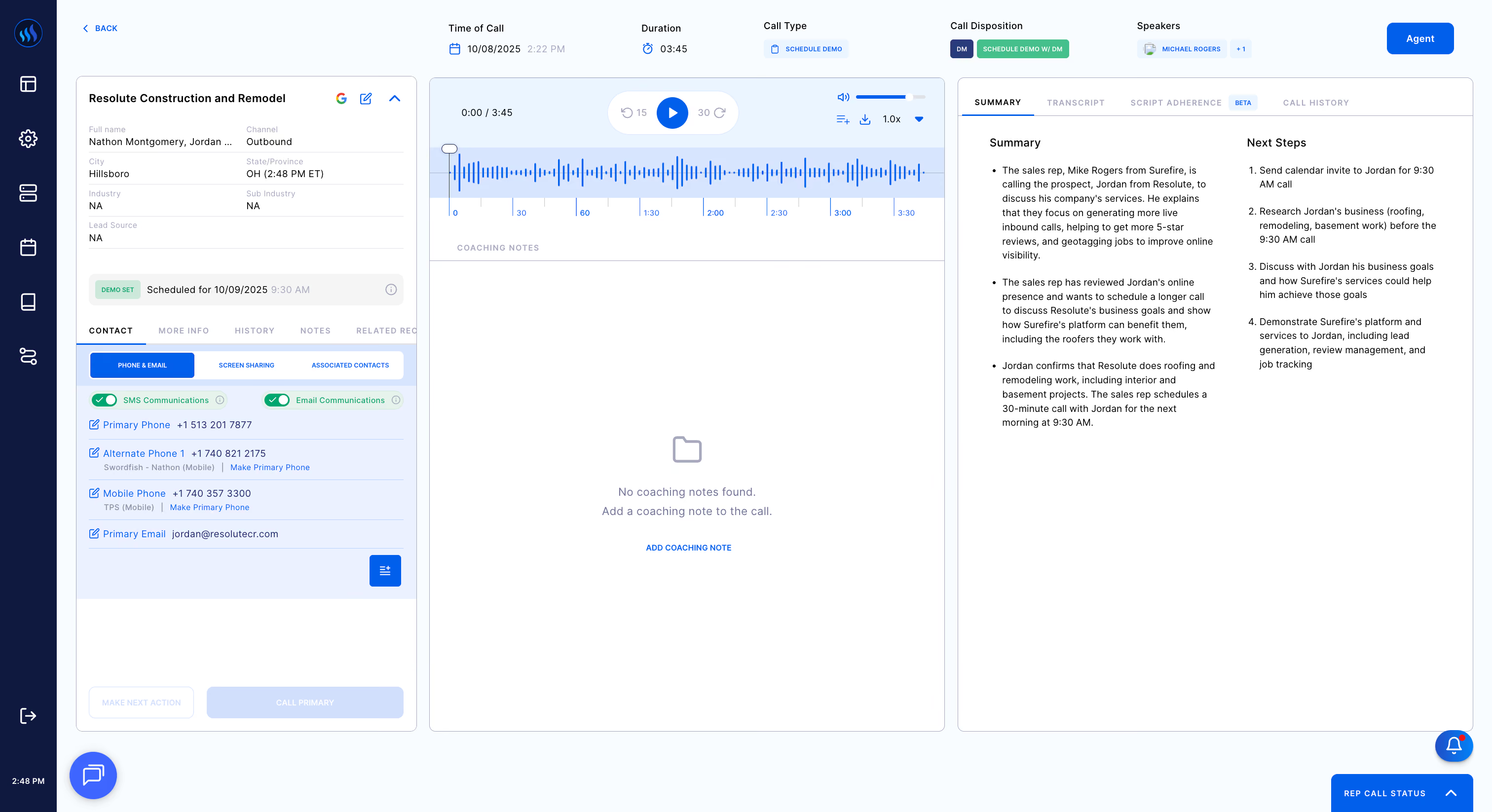
Original Call Report Before Redesign
Design Exploration 1 - Solve problems of existing call report
Problem Identified: Information Overload
In the existing Call Report, users struggled to identify:
❌ Important moments
❌ Performance gaps
❌ Next actions
Design Solution: A Clearer Information Hierarchy
✅ Transcript evidence as the screen focus
✅ Auto-generated anchored coaching insights based on AI analysis of the call performance
✅ Supporting information such as lead info., call info., call summary, etc.
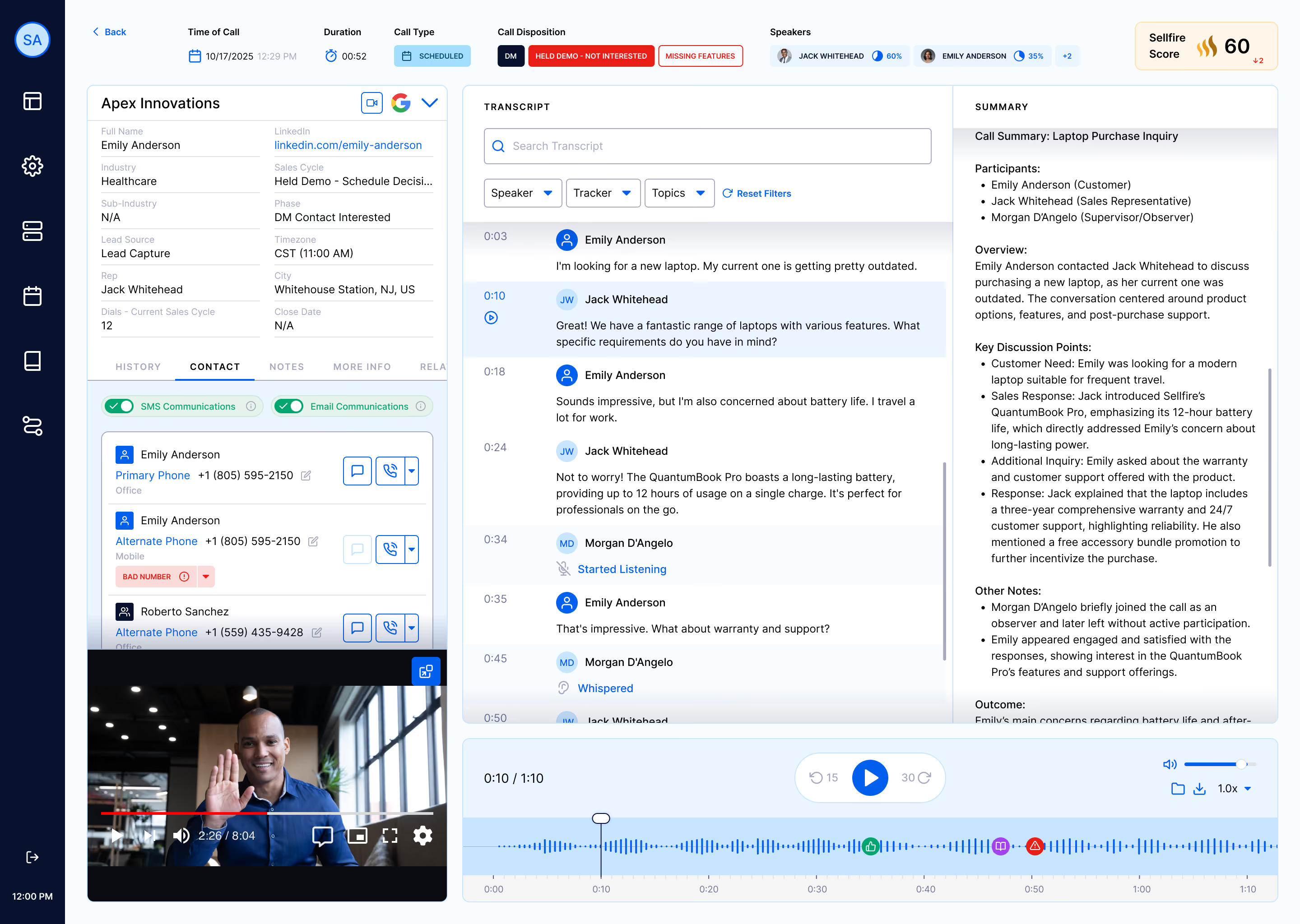
Rearranged Panels & Clearer Information Architecture
Design Exploration 2: Create Separate experience for Different Users
The reps and managers had different goals when looking into the call report:
Rep View
❓ "How can I improve?"
✅ Include: personal performance, strengths, weaknesses, coaching recommendations
Manager View
❓ "How can I coach my team?"
✅ Include: team insights, coaching opportunities, feedback workflows
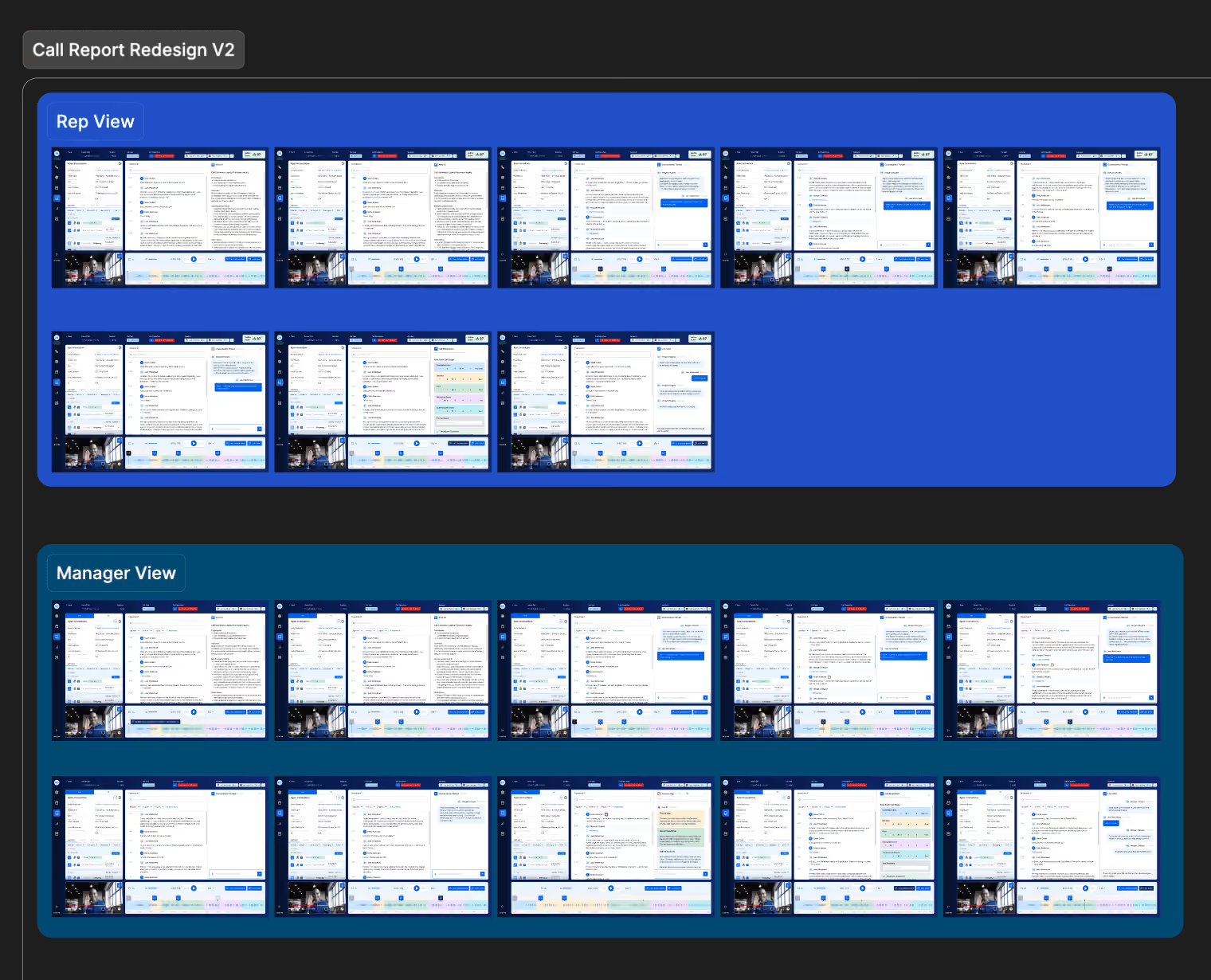
Separate Views For Reps & Managers
Design Exploration 3: Make AI More Interactive
The current AI insights were informative but passive. The most effective quick fix was to add more interactive insight anchors so that our users could:
✅ Click insights
✅ Jump to transcript moments
✅ Explore AI reasoning
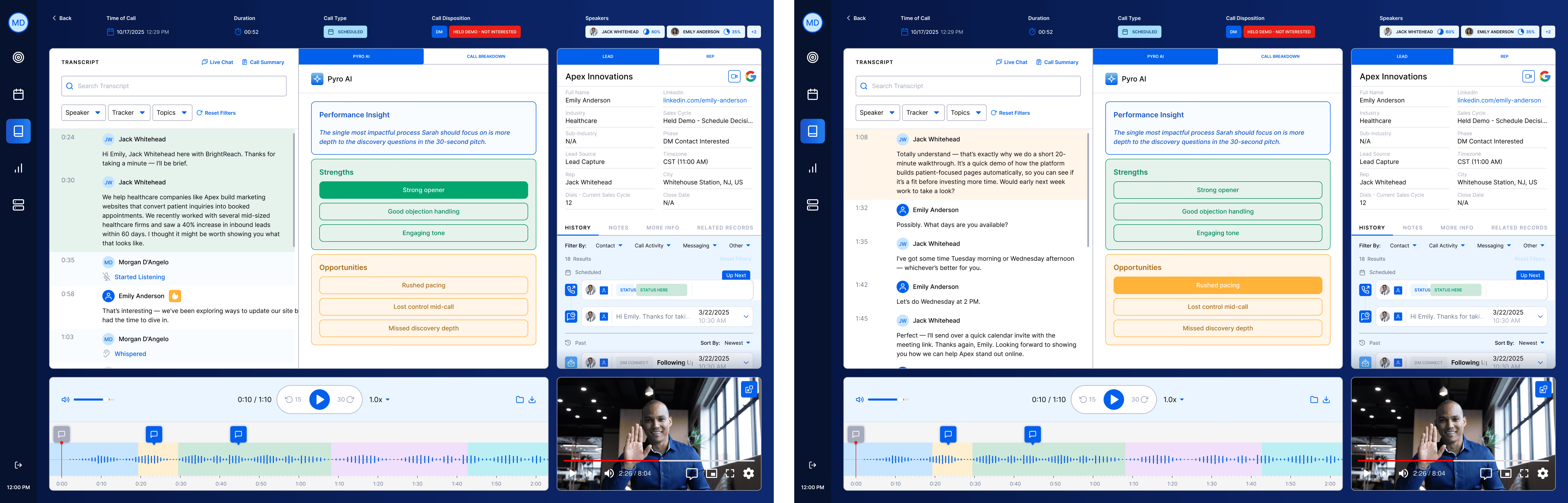
Interactive Performance Insights
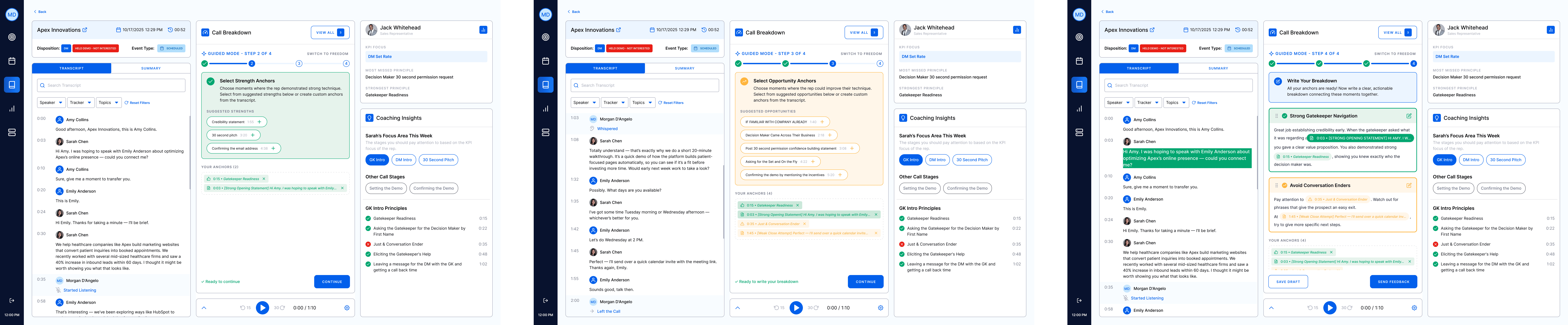
Design Exploration 4: Further Upgrade with AI Call Breakdown
Problem:
❌ Manual performance evaluation was time-consuming for managers.
❌ Using a rating system for call breakdown is not specific and insightful enough for reps.
Design Solution:
✅ AI-powered step-by-step flow to create balanced, actionable feedback with more detailed performance insights targeting each rep.

Creating an AI-Generated Call Breakdown in 'Guide Me' Mode
Finalizing Call Report Experience
Finalized Call Report Including Call Information, AI Summary,
AI-Powered Performance Breakdown, Coaching Insights, Transcript Evidence, and Feedback
AI Coaching Moment
Bringing AI Guidance Into Existing Workflows
Problem
❌ Sales reps often receive feedback too late. By the time coaching happens, the learning opportunity is gone.
Opportunity
❓ How might AI provide guidance at the moment it matters?
Exploration & User Validation
- Created multiple concepts including notification, popup card, and embedded workflow prompt
- Conducted focus group preference studies with sales reps and managers around timing, placement, information density, and interruptiveness
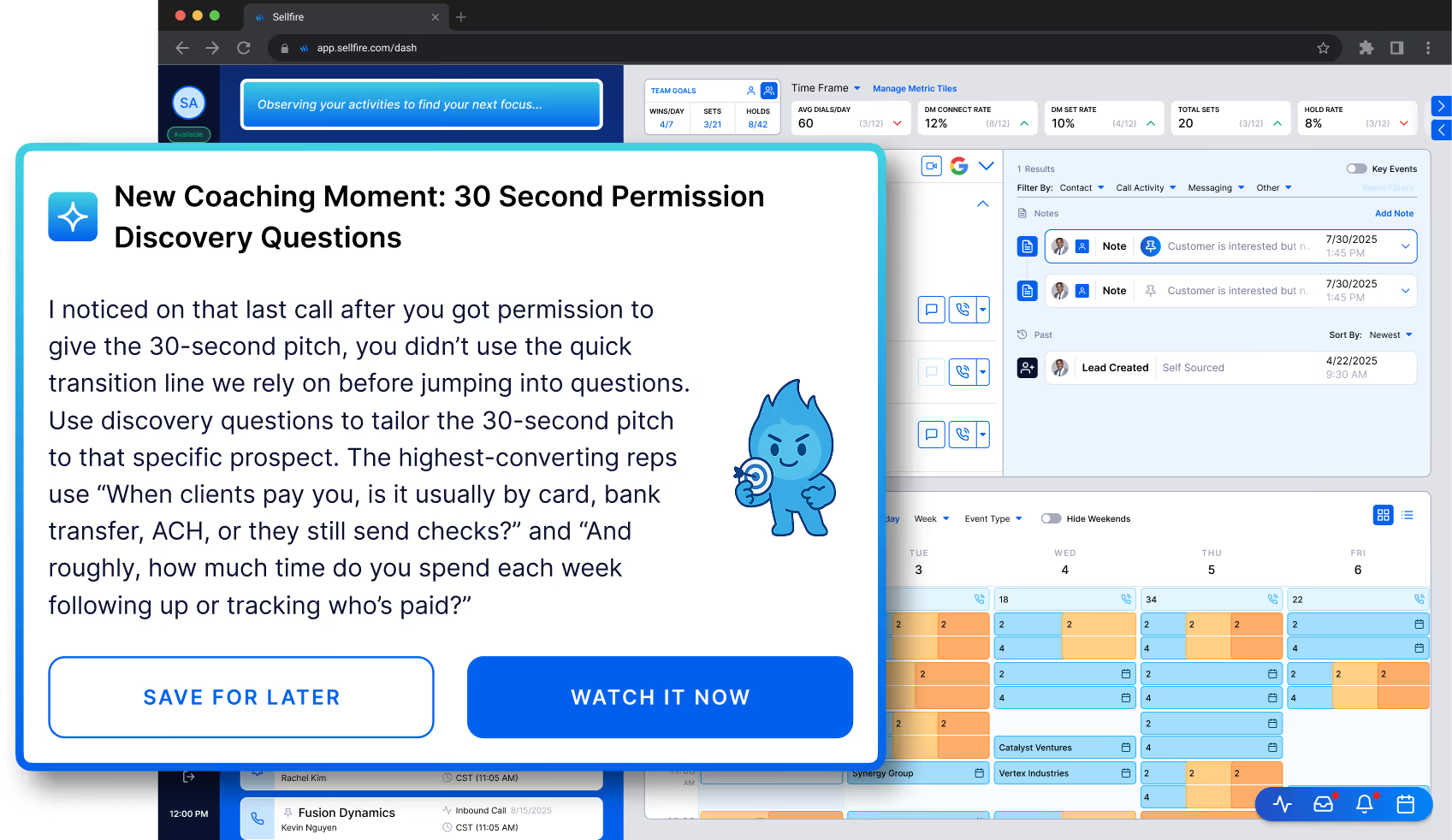
Final Solution: AI Coaching Moment
✅ A lightweight contextual prompt inside the dial queue that provides AI-generated coaching content after the AI identifies a process gap in the call.
✅ Including positive reinforcement, coaching suggestions, and learning resources tailored for each rep.
Coaching Hub Evolution
From Dashboard → Embedded Coaching Experience
V1: Dedicated Coaching Hub
Designed separate spaces for:
Rep
- Weekly impact plan
- Coaching feed
- Practice center
Manager
- Coaching calendar
- Coaching radar
- Team insights
Problem:
❌ Users needed to leave their workflow.
V2: Embedded Coaching Panel
Moved coaching insights closer to daily workflows.
Benefits:
✅ Less navigation
✅ More contextual
✅ Faster action
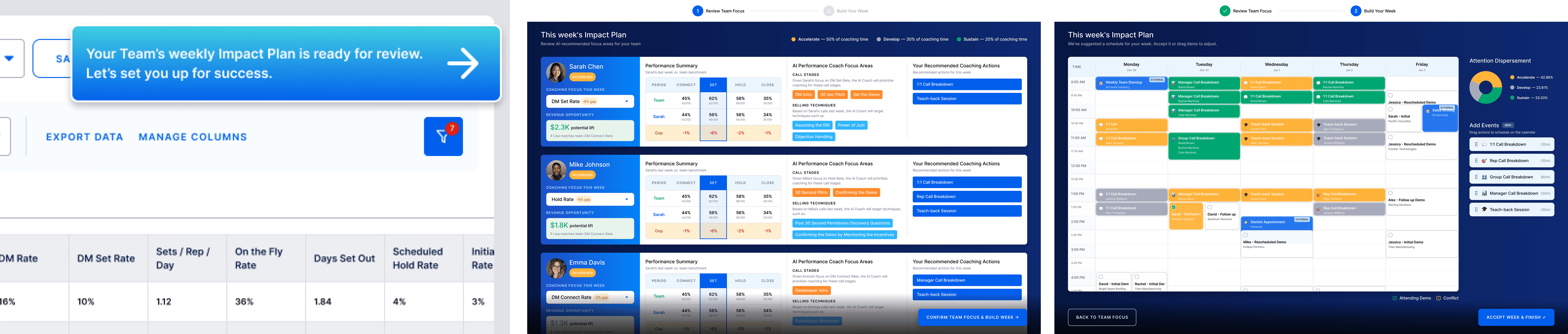
Final Solution: Bringing AI Coaching Into Existing Dashboard
✅ Instead of creating another destination, AI insights appear where users already work.